

I made a plugin (here) for Godot via GDExtension using godot-cpp bindings.
It’s a recreation of VSCode’s Quick Open for MRU (Most Recently Used) files in Godot simply to make my life a bit easier as I hate being pulled away from the keyboard so much while writing code inside Godot.
I want to share the process here should anyone else be interested in creating their own Godot plugins with c++.
Content
Process
WARNING: This was a first attempt and I’m no C++ and/or Godot expert.
Also - I will describe the steps I took to get my environment setup for developing this specific plugin. As I developed this plugin on windows, these steps will reflect that. However, it should be trivial to change things for yourself to focus on either linux or mac.
Dependencies
Installing C++ Compiler & Setup
I used Msys2 to install mingw64. Once Msys2 is installed, add the bin dir to your sys env path. For example: C:\msys2\ucrt64\bin.
NOTE: Because windows, I had to signout and sign back in to get the sys env changes to take effect.
Once Msys2 is installed, you can launch the MSYS2 UCRT46 shell and then install mingw via the pacman package manager.
For example:
pacman -S --needed base-devel mingw-w64-ucrt-x86_64-toolchain
NOTE: If missing gdb, install with
pacman -S mingw-w64-ucrt-x86_64-gdb.
I finally verified gcc & gbd by running both gcc --version & gdb --version via cmd shell.
Installing CMake & Setup
CMake is not the build generator/system that Godot uses, that would be SCons, but I am familiar with CMake so that’s what I used despite the friction. I installed CMake for windows here.
Install CMake Tools for VSCode
Searched for CMake Tools via VSCode’s extension manager and then installed it.
CMake File
This was a large part of the project, made more complicated due to the fact that I wanted to create a workflow in GitHub Actions to build and publish releases - so I need this rock-solid.
My CMakelists.txt
file is what I ended up with and it works perfectly on my machine (also multiple gh runners). This is not intended to be a full CMake breakdown, but I will explain a few parts that required some discovery.
CMake Version
The gh runners have CMake version 3.31.0 installed, so cmake_minimum_required(VERSION 3.31.0...4.3.0) is the solution to that. Not necessarily critical but worth noting.
Fetching godot-cpp
I really like making use of FetchContent in CMake, so I did it here for godot-cpp. There was also some reason as to why I fetched it as a release/zip versus cloning, I forget now. I can only do so much.
# i like my external libs in a special dir
set(EXTERNAL_DIR "${CMAKE_CURRENT_SOURCE_DIR}/external/")

include(FetchContent)

FetchContent_Declare(
        godot-cpp
        URL https://github.com/godotengine/godot-cpp/archive/refs/tags/godot-4.5-stable.zip
        SOURCE_DIR     ${EXTERNAL_DIR}godot-cpp
)
FetchContent_MakeAvailable(godot-cpp)
Configuring godot-cpp
Something important to note about using CMake instead of SCons, godot-cpp would just keep building in debug mode. Which is fine until you want to publish it and don’t want a massive dll.
To solve that, I had to set an env var to force it to follow our CMake build type.
# Store build-type to suffix for use with godot-cpp and dir names
if(CMAKE_BUILD_TYPE STREQUAL "Debug")
        set(SUFFIX "debug")
else()
        set(SUFFIX "release")
endif()

# this is the important bit
set(GODOTCPP_TARGET "template_${SUFFIX}")
Linking godot-cpp
Now all that is left was to link godot-cpp to my project.
target_link_libraries(${CMAKE_PROJECT_NAME} godot-cpp)
VSCode Setup
I had to select the correct gcc for CMake Tools in VSCode. Which was easily done by pressing Ctrl + Shift + P then typing cmake then selecting Cmake: Select a Kit then finally selecting my GCC installed via Msys2.
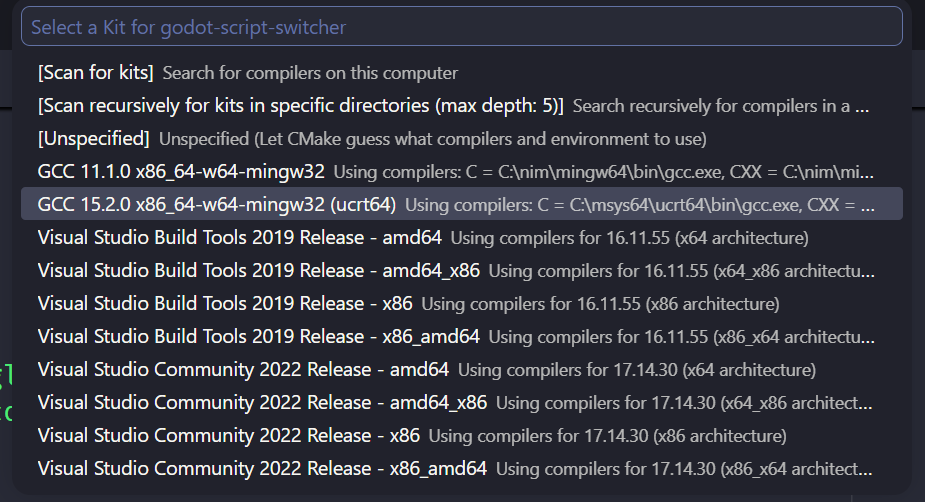
Now I could build my plugin in VSCode by simply pressing F7. Build times were okay on my laptop with 16 cores.
NOTE: You can select variants with CMake Tools to target debug/release build types.
Code
Inside the godot-cpp files, there is a demo project you can use as a starting point.
./godot-cpp/test/src
I put all my actual code files into the src/ dir and build all files in there into my CMake project. We require register_types.cpp and register_types.hpp files in our project, which registers our plugin with Godot. You also set the ModuleInitializationLevel here, which you’ll have to look up; my plugin is registered as MODULE_INITIALIZATION_LEVEL_EDITOR since it’s targeting the editor.
File available here: register_types.cpp.
void initialize_script_switcher_module(ModuleInitializationLevel p_level) {
	if (p_level != MODULE_INITIALIZATION_LEVEL_EDITOR) {
		return;
	}

        // TODO add classes here
	GDREGISTER_CLASS(ScriptSwitcher);
}

void uninitialize_script_switcher_module(ModuleInitializationLevel p_level) {
	if (p_level != MODULE_INITIALIZATION_LEVEL_EDITOR) {
		return;
	}
}

extern "C" {

        GDExtensionBool GDE_EXPORT script_switcher_init(GDExtensionInterfaceGetProcAddress p_get_proc_address, GDExtensionClassLibraryPtr p_library, GDExtensionInitialization *r_initialization) {
                godot::GDExtensionBinding::InitObject init_obj(p_get_proc_address, p_library, r_initialization);

                init_obj.register_initializer(initialize_script_switcher_module);
                init_obj.register_terminator(uninitialize_script_switcher_module);
                init_obj.set_minimum_library_initialization_level(MODULE_INITIALIZATION_LEVEL_EDITOR);

                return init_obj.init();
        }
}
Also important here is the GDREGISTER_CLASS macro. This is where we let Godot know about our Class and is definitely required.
Now, inside the actual plugin class, you also have to tell Godot about some of your methods: if they need to be accessible inside Godot or if you’re overriding built-ins. My plugin connected to 2 signals so I had two methods to bind:
void ScriptSwitcher::_bind_methods()
{
        ClassDB::bind_method(D_METHOD("_on_script_changed", "script"), &ScriptSwitcher::_on_script_changed);
        ClassDB::bind_method(D_METHOD("_on_popup_visibility_changed"), &ScriptSwitcher::_on_popup_visibility_changed);
}
Plugin Files
Godot likes its plugins in the dir <godot_project>/addons/<plugin name>/. That’s where our .dll/.so/.dylib will go. Additionally, you need 3 more files: plugin.cfg, <plugin name>.gdextension and <plugin name>.gd.
Plugin.cfg
This simply defines some metadata about our plugin to Godot that’ll show up in the plugin list when someone enables it.
[plugin]

name="GodotScriptSwitcher"
description="Quick switching of open scripts in the ScriptEditor with Ctrl + Tab."
author="Travis Lee Presnell"
version="1.0"
script="godot_script_switcher.gd"
GDExtension File
This file was more frightening; I had to turn the lights on.
[configuration]
entry_symbol = "script_switcher_init"
compatibility_minimum = "4.6"
reloadable = true

[libraries]
windows.debug.x86_64 = "res://addons/godot_script_switcher/godot_script_switcher.dll"
windows.release.x86_64 = "res://addons/godot_script_switcher/godot_script_switcher.dll"
linux.debug.x86_64 = "res://addons/godot_script_switcher/godot_script_switcher.so"
linux.release.x86_64 = "res://addons/godot_script_switcher/godot_script_switcher.so"
macos.debug = "res://addons/godot_script_switcher/godot_script_switcher.dylib"
macos.release = "res://addons/godot_script_switcher/godot_script_switcher.dylib"
The lights calmed me down and I discovered that all we’re doing is pointing to Godot our plugin init function and pointing to our built plugin files.
Entry point
For the entry_symbol = "script_switcher_init" we defined this in the C section of our register_types.cpp file. Specifically this line GDExtensionBool GDE_EXPORT script_switcher_init(...) {...}.
Version & reloadable
The version of godot-cpp I used was 4.5, but I targeted Godot 4.6 for my plugin without issue.
YMMV
So I set compatibility_minimum = "4.6".
For reloadable = true just means Godot will detect for changes to the file and then reload it. Word of caution: If you’re like me and try to free Godot managed memory via your plugin - It will crash. I spent most of my dev time with a crashing editor due to trying to free up my ScriptEditor reference on _exit_tree. The take away: do not free up singletons you get from Godot. Godot manages its own memory, it does not want you interfering.
Plugin GDScript File
I don’t know if every plugin needs this, but it seemed required for mine as the plugin was not able to be enabled without it.
@tool
extends ScriptSwitcher
Final Thoughts
I found it very tedious to keep manually launching/reloading my Godot editor. Late in the game I discovered an ancient strategy to solve this problem: C:\...>Godot_v4.6-stable_win64_console.exe -e --path "C:\...\godot-script-switcher\godot".
Godot can be commanded by the cmdline, even opening a specific project. Give it a shot.
It was overall much easier than I expected to make a plugin in Godot, expecially in C++. I’m very happy with my plugin even though there are a few things I still want/need to add to it. I also have plans to make another and I’ll be using this project as a template. Thanks Godot.